2021年5月30日 星期日

for xamain.ios ,the GrowingTextView & use it as "InputAccessoryView" for other textfield/textview

環境 XCODE 12.4, IOS14.4 

1.參考「https://stackoverflow.com/questions/16868117/uitextview-that-expands-to-text-using-auto-layout」,製作grewing text view 的xib. 
(我是直接用xcode interface builder的 Hight Priority & content Hugging Priority那段去做的,畢竟我連swift都還不會)

2.參考「www.dotnetmobile.com/XamariniOS/CreatingCustomView」及「https://docs.microsoft.com/zh-tw/xamarin/ios/user-interface/storyboards/」把這個xib跟c#做連結,

參考結果
ViewGrowingText.cs  ViewGrowingText.designer.cs ViewGrowingText.xib

如果你直接把它加入UIViewController去試跑,應該是有這效果.

---sample code----

var TxtTest = UI.ViewGrowingText.Create();

 TxtTest.Frame = new CoreGraphics.CGRect(0, 200, View.Frame.Width, 30);

//viewMain是我們在xcode中用outlet指定最底層的view為此UIViewcontroller中的變數成員,基本上跟「View」這個在UIViewController中的變數是同一個東西

viewMain.AddSubview(TxtTest); 

viewMain.LayoutIfNeeded();

----------------


-----實驗完記得把這個TxtTest移掉,因為這不是我們要的結果-----

現在,我們在目前的UIViewController底部加一個TextView(或是TextField沒差)名字為「txtMsg2Send」

我們要把個GrowingTextView放到小鍵盤上面,而且要能自已依照灰色TextView加減的高度而自己跟著調整高度,要在操作txtMsg2Send會出現

直接看code吧

------------------------------------------------

 nfloat orgHeightOfTxtViewOfInputAccessoryView = 0;

UI.ViewGrowingText inputAccessoryView =null;

UITextView txtViewOfInputAccessoryView =null;

public override void ViewDidLoad() {   
     base.ViewDidLoad();

if (inputAccessoryView == null) {

                inputAccessoryView = UI.ViewGrowingText.Create();

                txtViewOfInputAccessoryView = inputAccessoryView.GetTextView();

                inputAccessoryView.Frame =

                    new CoreGraphics.CGRect(0, 0, View.Frame.Width, txtViewOfInputAccessoryView.Frame.Height);

                inputAccessoryView.AutoresizingMask = UIViewAutoresizing.FlexibleHeight;

                 //把這個會長高長壯的GrowingTextView設定為底部的textView的鍵盤工具列

                txtMsg2Send.InputAccessoryView = inputAccessoryView;

             //先把最初的高度記下來.....

                orgHeightOfTxtViewOfInputAccessoryView = txtViewOfInputAccessoryView.Frame.Height;

            //重點來了!!文字變時.如何改變inputAccessoryView的高度!?

                txtViewOfInputAccessoryView.Changed += (object sender, EventArgs e) => {

                    var _t = new System.Threading.Thread(new System.Threading.ThreadStart(() => {

                        InvokeOnMainThread(async () => {

                            await Task.Delay(50);

                            //只比較textView高度到小數點三位數 

                            if (Math.Round(txtViewOfInputAccessoryView.Frame.Size.Height, 3, MidpointRounding.AwayFromZero) !=

                                             Math.Round(orgHeightOfTxtViewOfInputAccessoryView, 3, MidpointRounding.AwayFromZero)) {

                               //高度異動!!調整外層inputAccessoryView的高度

                             //光是用Frame=....是沒用的,要動到cosntraints裡才會作動!!

                                orgHeightOfTxtViewOfInputAccessoryView = (float)txtViewOfInputAccessoryView.Frame.Size.Height;


                                var cst =

                                   inputAccessoryView.Superview.Constraints.Where(Q => Q.Identifier() == "accessoryHeight").FirstOrDefault();

                                cst.Active = false;

                                inputAccessoryView.LayoutIfNeeded();

                                cst.Constant = orgHeightOfTxtViewOfInputAccessoryView;

                                cst.Active = true;

                                inputAccessoryView.Superview.AddConstraint(cst);

                                if (inputAccessoryView.Superview.Superview != null) {

                                    inputAccessoryView.Superview.Superview.LayoutIfNeeded();

                                }

                            }

                        });

                    }));

                    _t.Start();

           ...

          ...end of ViewDidLoad.....

  }  

-------------------------------------------------

結果....
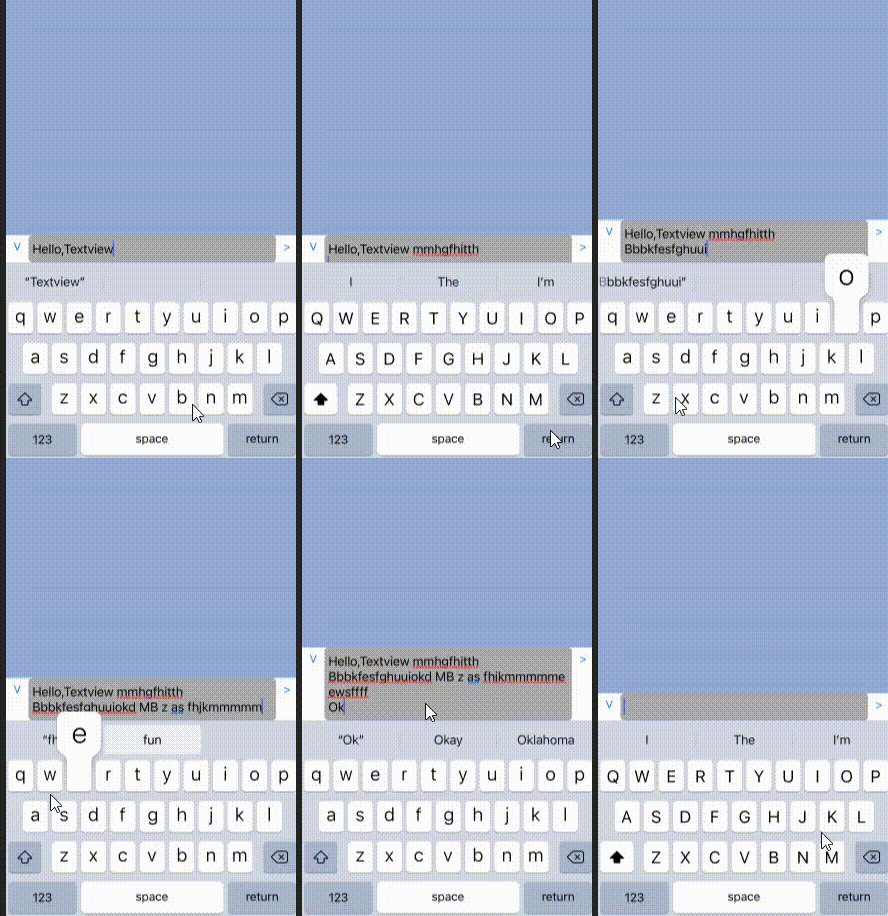


是不是愈來愈有專業的樣子了呢?

OS:自從我用了GrowingTextView之後,考試都考一百分,而且人明顯高了、壯了、變得更美了,自信心都回到我身邊了(只差沒說武漢肺炎也好了)

上述那段紅字,請參考這裡  我只是把它改成xamarin c# 罷了,懂得真的太少了,真的要花點時間學swift了

另一種作法是在出現小鍵盤時,整個畫面往上捲,配合在UIViewController底部的GrowingText來做到這效果,請參這裡 的keyboard事件處理

哪個好!? 鐘鼎山林,人各有志,攏好啦

大家加油吧

(反正疫情期間哪都不能去,乖乖在家好好寫程式吧)


2021年5月25日 星期二

Xamarin.ios : UILabel要能接收click事件

 現在xamarin.ios的xib都只能在xcode之下設計了,著實非常不便

但沒辦法,實在不想用xamarin form 架構,只好認命了

UILabel雖然在xcode interfacebuilder中有「UserInteractionEnabled」設定可以讓你勾,

但,經過實驗,真的,你還是要在code中設定才能listen tap 事件,參考以下

------------------------------------

var tapRecognizer = new UITapGestureRecognizer();

            tapRecognizer.AddTarget(() => {

                 // tap時事件實作

                     ...

                    ...

                    ...

            });

            lblA.UserInteractionEnabled = true;

            tapRecognizer.NumberOfTapsRequired = 1;

            lblA.AddGestureRecognizer(tapRecognizer);

-------------------------------------

  我書讀不多,不知道原來addTarget是要這樣用(而不是action !?)

anyway,總之,要用AddTarget設定實作,UserInteractionEnabled要設定(雖然我已經在xcode設計階段就指定了,真的,還是要在code設定才行),NumberOfTapsRequired 也要指定,最後加入GestureRecognizer


參考:這裡

一起加油吧.

2021年5月21日 星期五

for android (xamrin.android)--切換activity時不要有動畫效果

 雖然有過場動畫會比較花俏可愛,但正式/商用app是不喜歡這種玩意兒的
如何取消過場動畫?
兩個指令就可以了

----在某個ativity裡要切換到下個actity的片段----------

Intent itxnNext= 

new Intent(this, typeof(下個actity類別的class路徑)).AddFlags(ActivityFlags.NoAnimation);

                StartActivity(itxnNext);

                OverridePendingTransition(0, 0);

                Finish();

-----------------------------------------------

注意!! 
OverridePenddingTransition指令一要在StartActivity指令之後,順序一定要對!!

不然你會試不出效果的!!

參考:這裡

一起加油吧


2021年4月1日 星期四

asp.net core web project 不給debug,直接「exited with code -1」結束

安安,給虧嗎? (會用「安安」的表示這一定是個老網民了)

安安不給虧不要緊,程式不給debug才麻煩吧

今天就是要講這樣一個故事--一個asp.net core web project從他台搬來新的PC

卻一直debug不行,直接結束,clear & rebuild也一樣,明明build都成功啊.....


試了很多次,跟之前的PC的環境比對,都查不出原因....
這時,請別再定睛在這console視窗畫面了,這個畫面是果,而因是在別的地方的--
來吧,看一下別的地方有沒有什麼線索漏了
嗯,好像在output window有相關的資訊....


看到了嗎?在我們的web application exe結束前,有個東西先掛了,他就是萬惡的(又在萬惡了.到底是多餓啊) iexplore.exe 啦,原來萬惡的藏鏡人tio係伊啦
先別管iexploere了,你聽過安X...,不,你聽過可以debug不用瀏覽器嗎?
當然行啊~
來吧,到專案的屬性,去把Build->Launch browser這項un-check掉,再來debug吧


如果一再遇到鬼打牆的事,那問題不是在對方,而是我們該改變一下方向了
大家加油吧


2021年3月16日 星期二

bitwise operation--合宜地操作bits ("ORing" and mask bits)

 就某32bit data而言  (ex : *pRccCfg)

經初始化0b0

我們把bit 22設定為1 之後 (by instruction : 「 *pRccCfg|= (1<<22) ; 」)

要把bit 24~26設定為0b110,又不能動到之前設定的其他bit值,如何是好?

作法1.一個bit一個bit設定

*pRccCfg!=(1<<25)

*pRccCfg!=(1<<26)

作法二,用罩除的方式,比較不建議請注意"~"的用法

*pRccCfg!=(7<<24); // "OR" the 3 bits by  0b111 

*pRccCfg &=~(1<<24);//shift the bit ,then "Complement them",then,use "AND" opeartion,

------------------------------------------------------------------------

同理,只是想清除某幾個bit,也是先 shift "on" bits ,"Complement  them",then ,use "AND"operation

ex:要把21&22 bits清除,但不要動到其他bits,請用以下方式

*pAddrRccCfg &=~(0x3<<21);

務必注意!!

~(0x3<<21) 是

11111111100111111111111111111111

而(~0x3<<21) 是

11111111100000000000000000000000 

千萬要注意順序

2021年2月24日 星期三

APNS從by certificate 到by jwt 的升級側記

apns一直都運作的好端端的, app客戶說要再加一個姊妹作,但是仍用同樣的apns機制(因為資料源都是一樣,只是內容有點差異)
於是故事就這樣展開了
目前apns server是windows server 2012,web project 是asp.net 4.5
參考以下的方式改寫了推播apns那段 
從此公主跟PG就過著幸福快樂的生活了.....想的美

當你trace到 var secretKey = CngKey.Import 時,會遇到「system cannot find the file specified 」例外,
可是明明路徑都正確啊......是的,你需要比較高的權限
相對的,你的application pool identity也要提高權限
然後....
你明明在IDE中執行httpClient.SendAsync都很正常,可是怎麼放在iis給他執行就出現這種例外
「call to SSPI failed, see inner exception. StackTrace:   at System.Net.Security.SslState.InternalEndProcessAuthentication(LazyAsyncResult lazyResult)
...
..
...」
答案是......server 2012的IIS不支援http/2
所以,請把你的server升級到server 2016再來打怪吧

花了半天升級了server,結果又是在httpClient.SendAsync出錯,這時是....「timeout」!?
可是明明在IDE debug確又正常啊.....
那就是要升級你的framework的時候了,把專案從4.5升級到4.6吧
(前輩如是說的.....https://stackoverflow.com/questions/32685151/how-to-make-the-net-httpclient-use-http-2-0)
還有,別再用httpTwo了而是用「WinHttpHandler」,如同第33則po文一樣--
-------------------
1.Make sure you are on the latest version of Windows 10.

2.Install WinHttpHandler:

Install-Package System.Net.Http.WinHttpHandler

3.Extend WinHttpHandler to add http2.0 support:

public class Http2CustomHandler : WinHttpHandler
{
    protected override Task<HttpResponseMessage> SendAsync(HttpRequestMessage request, System.Threading.CancellationToken cancellationToken)
    {
        request.Version = new Version("2.0");
        return base.SendAsync(request, cancellationToken);
    }
}

4.Pass above handler to the HttpClient constructor

using (var httpClient = new HttpClient(new Http2CustomHandler()))
{
      // your custom code
}
---------------------------------
(所以就是要用非同步的方式去呼叫了,沒差,用執行緒去做就是了)
雖然案主說你就再申請一個apns 憑證嘛.何必這樣大費周章?
可是每一個憑證每年都要換證,就是怕在換證時uer漏接了重要的訊息
這次一做,日後很多個APP都可以共用,也沒有期限問題,長痛不如短痛啊,根本性地解決問題,不亦快哉?

2021年2月21日 星期日

SecKeyChain.Add return Security.SecStatusCode.MissingEntitlement !?

 在xamarin ios經常更新,以往的加解密函數現在出現這現象
----code----

var s = new SecRecord(SecKind.GenericPassword) {

                ValueData = NSData.FromString(value),

                Generic = NSData.FromString(key),

                Invisible = true,

                CreationDate = NSDate.Now


            };

            var err = SecKeyChain.Add(s);

------------------

結果err傳回值是「Security.SecStatusCode.MissingEntitlement

好在別人已經踢到鐵板了,請參考以下的方式修改

https://forums.xamarin.com/discussion/145357/seckeychain-add-return-security-secstatuscode-missingentitlement

注意,其中的
------------

<key>keychain-access-groups</key>

<array>

<string>$(AppIdentifierPrefix)你的appBundle ID</string>

</array>

------------------------------------

紅色字$(AppIdentifierPrefix)要去掉,

這是用vs2019 IOS manifest Editor打開加入keychain選項他自己加上去的

要小心--盡信editor不如無editor


加油!!

2021年1月16日 星期六

for android : notification with vibration not work !?

 安卓開發就怕一直在改版的問題一再發生

最近很多開發者都遇到明明在notification的震動機制好好的,怎麼升級後又惦惦了

google了一下是要加上 audioattribute--
---example-----

 audioAttributes = new AudioAttributes.Builder()
                    .setContentType(AudioAttributes.CONTENT_TYPE_SONIFICATION)
                    .setUsage(AudioAttributes.USAGE_ALARM) //key
                    .build();
            mVibrator.vibrate(pattern, 1, audioAttributes);
-----------------
來源參考:
https://www.jianshu.com/p/3ec9158b2041
同場加映
有些圓標可以用線上的icon generator來產生
https://romannurik.github.io/AndroidAssetStudio/icons-launcher.html


請多加利用左側功能表中的background color等屬性
https://romannurik.github.io/AndroidAssetStudio/index.html <--這裡還有 notification icon generator可以用哦
(一升級就搞得大家雞飛狗跳的,希望馬斯克的手機系統不會這樣麻煩)
大家加油吧

2021年1月9日 星期六

初經驗--把.net core 專案發佈到他台主機IIS上遇到的問題

當你把彼端IIS & MSSQL express裝好了,並且也把「安裝 ASP.NET Core 模組/裝載套件組合」 裝好後,檔案也搬好了,你以為這樣就打完收工了?不,我們奇妙的冒險旅程才正要開始呢, 首你,把你先建立好的web & applicatoin 設好,port bind 也設了,用本機的網址去查驗一下 localhost:5000 結果出現這畫面....
去IIS的log查也沒有什麼具體的說明,只會讓你懷疑人生罷了 你需要一些踢過鐵板的人的經驗,參考....這個
看來看去,好像只有第四個選項「stdoutLogEnabled 」才是那一窗門,是的,那就打開他吧
--------------web.config-------------------------
<?xml version="1.0" encoding="utf-8"?>
<configuration>
  <location path="." inheritInChildApplications="false">
    <system.webServer>
      <handlers>
        <add name="aspNetCore" path="*" verb="*" modules="AspNetCoreModuleV2" resourceType="Unspecified" />
      </handlers>
      <aspNetCore processPath="dotnet" arguments=".\XXXXX.dll" stdoutLogEnabled="true" stdoutLogFile=".\logs\stdout" hostingModel="inprocess" />
    </system.webServer>
  </location>
</configuration>
---------------------------------------
改好改滿,重啟那個站台,再次request看看你的站台,你就會在你的.net core網站目錄下看到「logs」目錄,裡面有log檔了.....
--------------------------------
Unhandled exception. System.FormatException: Could not parse the JSON file.
 ---> System.Text.Json.JsonReaderException: 'S' is an invalid escapable character within a JSON string. The string should be correctly escaped. LineNumber: 10 | BytePositionInLine: 47.
   at System.Text.Json.ThrowHelper.ThrowJsonReaderException(Utf8JsonReader& json, ExceptionResource resource, Byte nextByte, ReadOnlySpan`1 bytes)
   at System.Text.Json.Utf8JsonReader.ConsumeStringAndValidate(ReadOnlySpan`1 data, Int32 idx)
   at System.Text.Json.Utf8JsonReader.ConsumeString()
-------------------------------
喏,看到了吧,是json檔設定有問題了,在佈署的資料夾中看到的json檔
最可疑的就是「appsettings.json」
-----------------------------------------


----------------------------------------
又是萬惡的斜線問題了,再加一條斜線改好後,重啟IIS那個.net core web後,其本上你用localhost:5000
去看,就是正常了


....那有用到database的部分,如何設定?
你除了是把.net core web 的application pool的identity設定為NetowrkService之外,
也要有sql server security & login的設定配合才行
參考這裡比較快 

解決:使用者’IIS APPPOOL\ASPNET v4.0’的登入失敗

可能比較正規的做法是這樣....

註 2021/02/23,不必如何大費周章,直接在appsettings.json改,
在connection string中,加入「;Integrated Security=false;」這屬性就是了

以上,大家加油了
(.net core 效能不錯的樣子,真香啊.....)


2020年10月11日 星期日

for xamarin android : how to play sound file (mp3)

 1.檔案一定是要mp3格式(wav檔不行)

2.檔案請放在「Resources」之下,本例為了跟其他資源區分,放在Resources/raw之下,

(有a1.mp3,a2.mp3....)

3.play sound的語法
A.用MediaPlayer:

var  player =MediaPlayer.Create(ApplicationContext,Resource.Raw.a1);
  player.Start();

B.用RingToneManager:

var uriString="android.resource://" + your_package_name + "/" +Resource.Raw.a1;

var uri=Android.Net.Uri.Parse(uriString);

Ringtone r = RingtoneManager.GetRingtone(ApplicationContext, uri);
r.Play();

----------------------------------------------------

以上,大家加油了!!